Provisioning GrowthBook experiments over REST
The GrowthBook MCP keeps an agent on rails — drafts only, no raw targeting. When you need fully-targeted experiments across several clients, reproducibly, that turns out to be a REST job. Here's what I learned wiring it up.
I’ve been automating the boring half of A/B testing: turning a scaffolded experiment in our codebase into a GrowthBook setup — a feature flag, the experiment, the targeting, the lot — the same way every time, across a handful of clients.
GrowthBook ships an MCP server, and for ad-hoc work it’s genuinely lovely. Ask it for a feature flag and it makes one; ask for an experiment and it creates a draft for you to launch by hand.
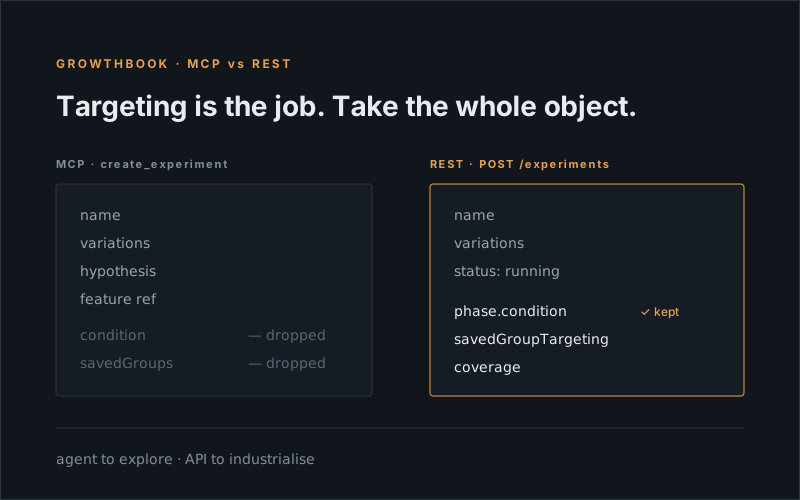
But look closely at what its create_experiment won’t let you hand it: targeting. It takes a name, variations, a hypothesis, the feature to link — but nothing about who sees it. No conditions, no traffic split, no saved groups, no coverage. Drafts only, and it makes you confirm you’ve reviewed your defaults before it’ll build one. None of that is a bug. It’s a server built to keep an agent from hurting itself, and for “spin me up a quick test” that’s exactly the rail you want.
It’s the wrong shape for “set these twelve experiments up, each fully targeted, identically, every time.” Targeting is the job here — get the audience or the page gate wrong and your results are quietly poisoned while everything still looks green. So I stepped off the rail and went to the REST API, which happily takes the whole experiment object.
Here’s what that taught me.
The owner “block” isn’t a block over REST
The thing I braced for was ownership. GrowthBook wants experiments owned by a real user, and I had it filed away as one of those things that trips people up. Over REST it simply doesn’t: omit owner and the API fills it in from the key’s own user.
const res = await fetch(`${API}/experiments`, {
  method: "POST",
  headers: { Authorization: `Bearer ${apiKey}`, "Content-Type": "application/json" },
  body: JSON.stringify({
    name: "CHECKOUT - Remove progress bar",
    trackingKey: "exp-123",
    project: PROJECT_ID,
    hashAttribute: "anonId",
    status: "running",
    variations: [
      { key: "0", name: "Control" },
      { key: "1", name: "Variation 1" }
    ]
    // no `owner` — GrowthBook assigns the API key's user
  })
});
// → 200
Features are a touch stricter — POST /features wants an owner email — but any valid account email resolves fine. So the whole thing is two calls: create the experiment, then create the feature with an experiment-ref rule pointing at it.
There’s a small trap in here that cost me a debugging round. You build the targeting inside the experiment’s phase, and the field you write is condition:
phases: [{
  name: "Main",
  dateStarted: new Date().toISOString(),
  coverage: 1,
  condition: JSON.stringify({ pageType: "category", previewMode: true }),
  savedGroupTargeting: [{ matchType: "any", savedGroups: [groupId] }]
}]
Read the experiment back and that same value comes out as targetingCondition. Write condition, read targetingCondition. Pass targetingCondition in and it’s silently dropped — and because savedGroupTargeting keeps its name in both directions, that half sticks, so the experiment looks half-wired and you go hunting in the wrong place. (While we’re here: don’t trust the MCP’s get_defaults datasource id over REST. For my key it pointed at a datasource that didn’t exist. Pull it from /data-sources.)
Targeting isn’t one shape — it’s per-client config
Every client is unique in how it targets, so I knew from the start this had to be configurable rather than one hardcoded function. It landed on three shapes, because the clients each answer “what page am I on?” differently.
One client sets a pageType attribute from page metadata, so I gate on it directly and map markets to domain saved groups. Another has no pageType at all and matches on the URL by convention — /p/ for product, /c/ for category, /s/ for search. A third is a single self-hosted site where the gate has to pin the hostname, because a path-only rule leaks onto co-branded subdomains.
Hardcode any one of those and you silently mis-target the other two. So the page-scope clauses became additive, optional, and driven by each client’s config:
const condition = {};
if (gb.usePageType)       condition.pageType = template;                      // metadata client
if (gb.pathnameMap?.[t])  condition.pathname = { $regex: gb.pathnameMap[t] }; // url-convention client
if (gb.hostname)          condition.hostname = gb.hostname;                   // self-hosted, single site
condition.previewMode = true; // ships behind preview — launch stays a human step
The lesson generalises past GrowthBook: “provision an experiment” is never one shape once you have more than one surface to run on. Push the differences into config and keep the builder dumb.
Match the trigger, not the convention
The last one is my favourite, because it’s a bug-class, not a bug.
Our client SDK records “this gate is met” by appending an id to an attribute array — and which array depends on the trigger type. An element-appeared trigger writes one array; a scroll-depth trigger writes another; a viewport trigger another again. If the server-side condition checks the wrong array, it never matches. The experiment enrols nobody, silently, while every part of it looks correct.
I hit exactly this: a condition checking one array, a trigger writing a different one. In preview I could see the id sitting in the array — just not the array the condition was reading. That mapping had been living in people’s heads, which is precisely where bugs like to live. So the provisioner now reads the trigger type out of the experiment’s own code and derives the array, so the two halves can’t drift:
// names illustrative — one entry per trigger type the SDK supports
const ARRAY_FOR = {
  "trigger-a": "gateArrayA",
  "trigger-b": "gateArrayB",
  "trigger-c": "gateArrayC"
};
condition[ARRAY_FOR[trigger.type]] = { $elemMatch: { $eq: trigger.attribute } };
Two systems you own, agreeing on a mapping by convention, is two systems waiting to disagree. Make one of them read the other.
So, MCP or REST?
They’re not rivals, they’re aimed at different jobs. The MCP keeps an agent on rails — guarded, draft-only, no raw stats knobs — and that’s genuinely the right tool for exploring. The moment you need full, reproducible, opinionated targeting across more than one project, that’s the rail you want to step off, and REST is sitting there with the complete object ready to take.
Reach for the agent to explore. Reach for the API to industrialise.
Happy experimenting 🔬